
Anúncios
You’ve probably seen those “night vision” clips that look like military goggles—bright green, glowing outlines, mysterious shadows—and thought: wait, can my phone actually do that?
Here’s the honest twist: most phones can’t do true infrared night vision without special hardware. Still, the right apps can dramatically improve low-light photos, boost visibility, or simulate that iconic “night vision” look.
Anúncios

Night Vision Camera FX
★ 4,5And if you pick the correct one for your goal, it feels almost like a cheat code for the dark.
What “Night Vision” Means on a Phone
On a smartphone, “night vision” usually falls into two buckets:
- Real low-light enhancement: better brightness and clarity by pushing exposure, ISO, and processing (great for night photos/videos).
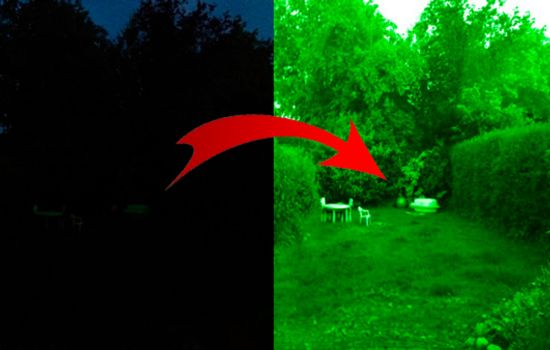
- Night-vision style effect: a visual filter for entertainment or a tactical look (cool, but not real infrared).
Anúncios
Some apps are very clear about this. For example, one popular Android listing literally says it’s not a real infrared night-vision camera.
The 3 Apps (Android + iOS) Mentioned Above
Below are the same options we cited earlier, now explained in a way that helps you choose fast.
1) Night Mode Camera Photo & Video (Android + iOS)
If your goal is seeing more in the dark—without turning it into a gimmick—this is the most straightforward pick. On iOS, it’s positioned as a camera app that helps capture “stunning” low-light photos and videos with improved brightness/clarity.
On Android, the Play Store description highlights low-light capture while also warning users that it’s not infrared night vision.
Why people like this style of app
- You open it and shoot right away.
- It focuses on making dark scenes usable.
- It’s closer to “night mode camera” than “prank filter.”
Best for
- Street photos at night
- Indoor low-light shots
- Night videos where you want more visibility
2) NightCap Camera (iOS) + Night Camera Mode: Video Photo (Android alternative)
NightCap is a classic iPhone choice if you want serious low-light tools. Its App Store description emphasizes long exposure, clearer low-light results, and even dedicated astronomy modes for night sky shots.
On Android, a comparable “night camera mode” option is typically positioned around helping you shoot photos and videos in low light, with controls and effects.
Why this combo matters
- iOS users get a very photography-leaning app (NightCap).
- Android users can go for a “night camera mode” app focused on low-light practicality.
Best for
- People who love tweaking settings
- Night scenery, city lights, and long exposure vibes
- Trying astrophotography (especially on iPhone)
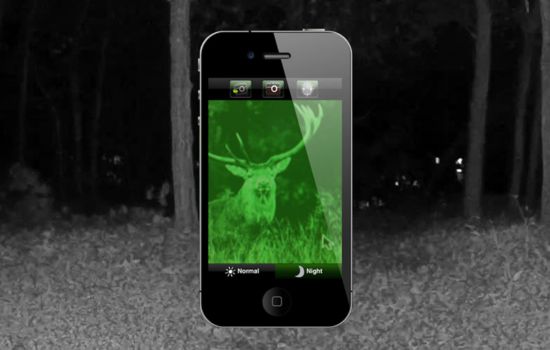
3) Night Vision Camera & Video (iOS) + Night Vision Camera FX (Android)
This is the category for the night-vision look. On Android, Night Vision Camera FX is explicitly described as an entertainment app that applies visual filter effects for a stylized night-vision appearance.
In other words: it can look awesome on screen, but it’s not magically detecting infrared heat or seeing through darkness like special goggles.
Best for
- Viral “night vision” aesthetics
- Fun videos, edits, and creative content
- That tactical green look for Reels/TikTok style shots
How to Choose the Right Night Vision App (Without Overthinking)
Pick based on your real intention, not the app title.
If you want genuinely better night photos/videos:
Go with Night Mode Camera Photo & Video first. It’s built around low-light capture and sets the expectation correctly.
If you want more control and “photography nerd” features:
Choose NightCap on iOS. It leans into long exposure and specialized night shooting modes.
On Android, try a “night camera mode” app that focuses on low-light video/photo support.
If you want the night-vision aesthetic for content:
Try Night Vision Camera FX on Android, which is clearly positioned as a stylized effect app.
On iOS, pick a night-vision themed camera app, but treat it as a filter category, not a tool.
What You Can Expect in Real Life (Quick Reality Check)
Here’s what usually happens the first time you test these apps:
- You point the camera at a dark room.
- The preview looks brighter, but also noisier.
- Details appear, but not like “military night goggles.”
- If there’s some light (streetlights, moonlight, TV glow), results can look surprisingly good.
So yes, it can feel impressive. However, it’s still physics. Phones need photons.
Also, if an app claims “infrared night vision,” be skeptical. Many listings explicitly state the opposite, like the Android example that says it’s not infrared night vision.
A Simple 10-Minute Test That Tells You Everything
Do this once and you’ll instantly know which app is worth keeping.
- Test A: Near total darkness
Turn off lights. Only keep a tiny light source (like a router LED).
Result you should expect: mostly grain, limited detail. - Test B: Low light (real world)
Go near a window at night or a street-lit area.
Result you should expect: much better clarity and brightness. - Test C: Motion
Wave your hand slowly. Then quickly.
Result you should expect: slower shutter = blur, faster shutter = darker image.
This is why apps that focus on camera control and exposure often feel “better,” because they balance brightness and motion.
Tips to Make Any “Night Vision” App Look Better
Small tweaks make a big difference.
- Clean your lens (seriously). Smudges kill night shots.
- Stabilize your phone. A wall, a table, or both hands helps.
- Don’t over-zoom. Zoom amplifies noise fast.
- Use nearby light. Even a hallway light helps a lot.
- Lower expectations in pitch-black rooms. Phones aren’t magic.
If you’re filming content, the “night vision FX” apps can look cooler if you add a tiny light source off-camera. That creates contrast and movement.
Common Mistakes People Make (and How to Avoid Them)
Mistake 1: expecting infrared vision
Unless you have special hardware, it’s almost always processing or filters. Some apps openly warn about that.
Mistake 2: using it in zero light and calling it “bad”
Most apps need some light to work well. City light is perfect.
Mistake 3: thinking “brighter” always means “better”
Over-brightening can destroy detail. Aim for clarity, not just brightness.
Mistake 4: ignoring motion blur
Night settings often use slower shutter speeds. Keep your hands steady.
Which App Should You Try First? (Fast Recommendations)
If you want the cleanest starting point, try this order:
- Night Mode Camera Photo & Video (best overall “low-light boost” approach across platforms).
- NightCap (iOS) if you want more serious night photography tools.
- Night Vision Camera FX (Android) if your goal is the stylized look for content.
And for Android users who want a practical night camera option, try a “Night Mode Camera: Photo Video” style app focused on low-light capture.
Conclusion
Night vision on a phone is part reality, part illusion—and the fun is knowing which is which. If you want real improvements in low light, start with Night Mode Camera Photo & Video and test it in street lighting or indoor low light. If you want to go deeper (and you’re on iPhone), NightCap Camera is the more “photography-serious” route, especially for long exposure and night sky experiments. And if your goal is the classic night-vision aesthetic, apps like Night Vision Camera FX exist for that exact entertainment vibe—just remember it’s a visual effect, not infrared goggles.
See also
- Learn Zumba on your phone and turn any day into an energy party
- App to Listen to Radio on Your Phone
- App to Turn Your Phone Into an Alexa: Discover How!
- Apps to See Who Visited Your Profile: Does It Really Work?
- How to Make the Most of Your Connection Without Paying